Showing posts with label robotics. Show all posts

Tuesday, November 27, 2018

What's In Your Elementary STEM Lab?


Often when people come to visit our lower school STEM lab they ask "how did you know what to put it in?" The truth is, we didn't, but we learned along the way. The first thing I would suggest to a school system wanting to create a STEM lab is not to try to buy everything in the beginning. Don't let the tools dictate the learning. Buy as you see needs and desires. I wish we had done this a bit more in the beginning.


This is what we currently have in our lab now that we are 3 years into the program:

  • Wonder Workshop Dash and Dot Robots. These are our "go to" robotics for elementary students. They work with 4 different apps- Wonder, Blockly, Go, Path...the various apps meet different levels of coding ability. Their durability is amazing.
  • Wonder Workshop Cue Robots. These robots even allow students to toggle between block coding a javascript.
  • Sphero Robots. Sturdy for use by young children and can even get them wet. 
  • Ozobots Evo and Bit. Start with color coding and move to block-based coding. 
  • Makey Makey. Inventor kit that allows students to turn everyday objects into keyboards using the concept of electric circuitry.  
  • Cube-lets. Small cubes that connect magnetically to create a larger simple robot. 
  • Merge Cubes. Hologram enabled Augmented/Virtual reality ability.
  • Legos. Great for engineering lessons. 
  • Magnetic building sets. Great for engineering lessons for younger children. 
  • Little Bits STEAM Student Sets. Tools needed for invention ideas in the student inventor book.  Each set can engage 3-4 students at one time. 
  • Little Bits. Circuits that snap together. 
  • LEGO Mindstorm EV3Robotics. Allows students to build, program and command these LEGO based robots.
  • LEGO Education WeDo kits. Curriculum, software and STEM, discovery-based project kits.
  • Makerbot 3D Printer. Ways to make 3D designs. 
  • 5 Lenovo Laptops. 
  • 5 iPads.
  • Class Set of Chromebooks.
  • Microscopes
  • Safety Goggles
  • Beakers
  • Extra large "LEGO" like building blocks. Large enough to set up different areas in the room by creating walls for separation
  • Markers
  • Glue Sticks
  • Glue
  • Glue guns
  • Tubs
  • Scissors
  • Aluminum Pans
  • Containers
  • Duct Tape
  • Construction Paper
  • Yarn
  • String
  • Paint
  • Other craft type supplies


At the beginning of the year we added one item on each grade level supply list for the lab:

Pre-K -1 pack of popsicle sticks
Kindergarten -1 package of sticky notes
First- 1 pack sandwich baggies
Second- 1 package drinking straws
Third- 1 package toothpicks
Fourth- 1 roll masking tape
Fifth- 1 roll scotch tape

Some of our tools are "go to" items. The robotics and coding platforms are used across the curriculum to teach in classroom concepts regardless of the subject matter. Our students code robots to show learning in everything from language arts, bible, science, math, and geography. The time our students spend in the STEM lab directly supports the integrated units in our lower school. It is taking science, technology, engineering and math and making it actionable.


Wednesday, May 16, 2018

Student Led Professional Development


I've been at school since 6:45am.  I was anxious about my morning and the lofty goals I had. It's now 10:00am and I am basking in the glory of positive completion! This morning ended a 9 week elective opportunity for students that signed up for the "Lower School Tech Team" elective. This team has worked for 9 weeks to create an Escape Room opportunity for the lower school teachers that taught them about STEAM tools. These 8 students created lesson plans and how to videos and modeled how you can teach using an Escape Room as the lesson.

This morning all the lower school teachers had a staggered start to come in and allow the students to show them how to use Dash Cleverbots, Ozobots, Sphero Robotics, Makey Makeys, and Echo Dots in the classroom. Based on feedback from teachers in January, this was an area they felt they needed more training in. The students manned all 5 stations and had the teachers learn more about these tools. As someone that was both nervous about allowing students to lead the PD and hoping that it truly would be seen as beneficial, I truly enjoyed hearing the interactions and the "aha moments" happening as each grade level worked their way through the challenges. Every grade level got through the 5 challenges in less than 20 minutes and my hope is that the teachers will have walked away thinking about potential ways they can use these tools in their own classroom in the future.

The thing that I am most proud of is allowing these students to have the opportunity to be part of authentic learning. The problem put before them was "The teachers want to learn more about tech tools." These kids showed up at 7:30am this morning (even though on Wednesdays their day starts at 9:00am) and enthusiastically taught their teachers what they knew. They supported without "doing it for them." Every one of them left feeling accomplished, needed, and fulfilled in what they participated in this morning. Students want authentic learning and to share their learning more globally. The morning of sharing with the lower school teachers and the website they created for reference allowed them this opportunity. Remember, this was an elective. Think on that for a moment!


Tuesday, March 20, 2018

Creating a Culture of Belonging for the Tech Loving Student


In the last few years our school has really stepped up our STEM/STEAM game. In this midst of creating opportunities for robotics, circuitry, design thinking competitions and coding, something unique has happened that we weren't expecting...we have empowered a new demographic at our school. Do you remember the iconic 1985 movie The Breakfast Club? Even in the trailer the BRAIN was left out of the introduction. There is always a place for the BEAUTY, JOCK, REBEL, and even the RECLUSE to find their way but it's sometimes not easy for the BRAINS to find their connection in our schools.

What we have found is that technology often is a pull for those personality types. If you remember Anthony Michael Hall's role in the movie, he wanted friendships and a sense of belonging. A day in Saturday school was a highlight for him because he felt he had friends. He found his sense of belonging that morning.

When I look at the demographics of our robotics teams and our lower school electives, I often see students that are on the autism spectrum choosing to also be a part of these programs. Don't hear me paint with a wide brush of generalization here- not all students in these programs are on the spectrum but it does seem to be a niche for many of our students that are there and it's nice that they have a sense of real community.

Last year, when I started my lower school student led tech support team, I noticed that many of the young gentlemen that chose to be a part really didn't have a "fit" elsewhere in our school- they weren't necessarily into athletics or the arts, they were the ones that quickly picked up on how to do things using instructional technology in the classroom and often became my help when teaching a new concept. By empowering these students, by allowing them to earn their "tech support staff" certification, I created a sense of importance for them. Understanding technology came easy for them and by recognizing that in them, we kind of "unleashed the beast!"

All of a sudden these same students were becoming innovators and creators using technology at home. They were joining the robotics team and getting plugged in. By creating this niche in our school we have created a sense of belonging for a new set of students that previously did not have a group to call their own. I am seeing this happen at all levels of our preK-12 school.

It is a standing tradition when an athletic team makes it to state playoffs they get a send-off in our upper school. The entire school fills the hallways and clap and cheer for these athletes as they leave the school to load the buses. But this year, something awesome happened. Our high school robotics team went to the state competition and had the same experience! It was the most beautiful thing I have seen all year as these kids received recognition for their hard work just like the "jocks" did. I believe we are each created with gifts and talents that make us uniquely who we are and image bearers of God. I am thankful that these students have the opportunity to use their gifts and talents for something that inspires them. I am also thankful to work in an area that gives opportunity to empower all students.


Sunday, March 18, 2018

Year Two - Elementary Tech Team Plan

Our elementary school creates an opportunity for our fourth and fifth-grade students to take part in Friday afternoon electives where they choose from about 7- 8 choices that teachers lead from their passions. The opportunities have been awesome- woodworking, knitting, makerspace, board games, digital gaming, are just a few. For me, it finally gave me the opportunity to create an elementary tech support team.  Last year our students researched and created step-by-step instructional supports for our teachers regarding the technology they use on a regular basis. The opportunity was awesome and the details of what we did and accomplished can be found here in this post: https://techhelpful.blogspot.com/2016/11/the-beauty-of-ownership-and-belonging.html

This year we are going a different direction. The students will once again create "how to" instructional supports that might be a Google doc or a video but we are making it a bit more fun. Recently, I asked our elementary teachers what they needed the most in terms of technology professional development. The answer was, "we want to have a better understanding of our STEAM tools."

Two weeks ago I had the opportunity to attend a workshop sponsored by Mozilla that allowed the attendees to create an escape room experience that would allow the users to learn more about iOT (internet of things) as they went through the experience. I loved the idea! So I challenged my 7 students in this quarter's tech team to think on this. We will have 10 weeks of 45 minutes on Friday to create our experience. Here is what we defined and how we are going to accomplish it:

Day 1:

  • I gave the students 3 sticky notes each and had students write down 3 STEAM tools they felt they could teach their teachers more about. We then sorted these ideas and came up with a list to work from. 
  • We then used the sticky note idea to write down 3 themes for our rooms. Each student wrote down their ideas and we sorted those. Based on which idea had the most votes, we went with an "ocean" theme.
  • Our next step was to assign groups and have each student start thinking about what their experience will look like with the STEAM tool they were assigned. For instance, they want to dress their Dash and Dot robots up like "pirmaids" (pirate mermaids) and have them go on a treasure hunt. 
Day 2: 

Our new STEAM Project Assistant and Curriculum coordinator will meet with our students and they will teach her skills because she is new to the job. Based on the questions she asks and the things they think she should know, they will start creating a list of basic skills needed for their tool. I'm actually out of town for this week so I created this video to help the students know what they would do for this week: 


Day 3:
Students will start creating their lesson plan for their escape room experience based on their ideas from day 1 and their notes from Day 2.

Day 4: Students will create green screen video productions of "how to" use the tech tools. These videos will be viewed by the teachers before they start their escape room experience for each tool. 

Day 5: We will upload all videos to last year's tech team website so that there is one place teachers can go for support. 

Day 6: We will continue to create a good escape room experience. Our goal is to offer it for each grade level to work together. 

Day 7: Students will create the experience and try each other's stations out and give feedback.

Day 8: Students will take the feedback from the previous week and finish up their end product.

Day 9: Students will use the time to decorate the room and offer the 30-minute professional development opportunity to any available teachers, admin, and parents.

Day 10: Students will once again use the time to decorate the room and offer the 30-minute professional development opportunity to any available teachers, admin, and parents.


Full STEAM Ahead at CCS


In the spring of 2016 our school was approached by a parent that wanted more STEAM opportunities for his daughters to take place at our school. Oftentimes people think that funding comes easy for private schools but I submit that it does not for individualized curricular projects. The grants aren't available to us and that was where I was as the Technology Coordinator in our lower school. Until this parent shared not only his vision but created funding opportunities, I just dreamed about integrating coding, robotics, circuitry, etc into our curriculum- the funding just wasn't there.

The change happened with the 2016-2017 school year and we were able to create a STEAM (Science, Technology, Engineering, Arts, Math) curriculum into our school that supported our integrated units. We were also able to hire a full time STEAM Project Assistant that would learn the nitty gritty of coding, robotics, circuitry, and the design thinking process. This STEAM Project Assistant meets with grade level teachers and works with them to create opportunities for integrated projected based learning as well as stand alone STEAM lesson plans that support weekly learning. The beauty of the way we have done this is that this STEAM Project Assistant creates embedded professional development opportunities for our teachers as well. They are able to learn about coding hand-in-hand with their students. Our goal with our STEAM program is to give our students a variety of experiences to broaden their understanding of potential STEAM jobs for their futures. We have adopted the concept of these lesson plans to not be associated with a "grade." This is our attempt to create a culture that makes students lead with curiosity and not fear failing. Our project based learning opportunities are graded by the teachers but any weekly STEAM lessons that do not impact the PBLs are considered scaffolding for learning.

This change opened the door for our students to have a variety of new experiences and for some of our students there was an immediate "click." We were already a tech-rich lower school with rolling carts of iPads and chrome books in grades preK-4th and a 1:1 environment for our fifth graders but the STEAM program created more opportunities to use the technology beyond the 4 C's of technology integration- curation, consumption, creation, and connection in ways we had not had the ability to do before.
We are programming robots and concepts, making green screen productions and showing our elementary students how to make websites. We were taking our possibilities to a new level like never before. For some of our students, we peaked an interest...we were empowering the "brains."

Wednesday, March 7, 2018

Connecting Computer Science to Today's World


In the globally connected world that we are currently in and the ease at which people from all over the world can be hired in a brief moment to do jobs that in the past could not be outsourced easily, it's time to rethink computer science in our schools.

Recently I had the opportunity to talk with a STEM district leader and heard concerns about teaching both more and higher level computer science classes in their district. I think it is fair to say that many school systems are looking deeply at the scope and sequence of computer science for our students.

In the state of Tennessee, Computer Science falls under the category of CTE (Career and Technical Training)- this was what was known as vocational education a few years back.  As a former business education certified teacher, I would be considered qualified to teach Computer Science classes because our state does not currently have a computer science endorsement (and I can tell you I do not have the skill set for what that means today). In my opinion, this is a travesty to today's students and the future workforce of our state and country.  In a world where we are tracking students into college ready or CTE we have segmented both the availability of these classes away from students that might truly be interested in this as a college career. STEM jobs are the fastest growing need in our country today but so many states need to step up to create more fluid opportunities for this to happen.

Some school systems have adopted a curriculum called "Project Lead the Way" that embeds coding skills into the science curriculum. This is an attempt to give students both the experience of coding and to create pathways for interested college-bound students to move in that direction. While I believe in embedded and integrated technology, I am somewhat concerned that this process isn't truly creating the path that is rigorous enough for the future.

At Chattanooga Christian School we happen to have a faculty member, Cathy Smith, with a robust programming background. But the truth of the matter is, most schools aren't this fortunate and therefore they can't afford to hire the level of knowledge base needed on a school budget. When speaking to my STEM friend I could see how she was trying to bridge the issues that she sees in computer science and our state. You see, someone with high level computer science skills can walk into IT opportunities all over the country that would allow them to double or triple what they can make in any school system. How do we tap into this? Adjunct faculty? CCS is blessed by Cathy Smith. We are one of only a handful of school's that even offers any AP Computer Science classes. According to code.org, "Tennessee had only 625 computer science graduates in 2015; only 18% were female. Only 934 exams were taken in AP Computer Science by high school students in Tennessee in 2017." Folks, nationally only 10 percent of schools teach AP Computer Science classes. I'm thankful we are one of them...but these statistics have to change. 

I am thankful to work in a school system that has a remarkable faculty that understands the math scaffolding needed to develop an understanding of programming. This is an area that causes struggles for many school systems in that the required logic, math, and scientific scaffolding isn't happening for most of the students that are on a CTE track and the lack of wiggle room in elective choices creates some disconnect for college bound students being able to choose this CTE track option.

It's time for state education systems to re-evaluate Computer Science in the realms of availability, quality instructors, and how it integrates into the educational climate as a whole. Just because a student has "done HTML" or "coded in Scratch" does not mean that they have a skill set that will help them critically create something of worth in the future.  It's time for us all to get intentional about computer science and it's scope and sequence starting in pre-K. I am a firm believer that even the youngest child has the ability to start thinking in the sequential manner needed to be future coders. Edtech companies are on board trying to create stepping stone opportunities for this to happen through such things as drag and drop block coding, and kid friendly robotics like Wonder Workshop's Dash and Dot. These resources are what make intentional computer science options available for students and there are ways to embed these skills into our daily curriculum. We are doing just that in our elementary school, in an introductory level.

Research shows that by age 12 most students have a mindset for or against all things STEM and what they want to do with their future. It is imperative that we start creating those experiences and opportunities in intentional ways for our future workforce.

Tuesday, November 14, 2017

Christmas Tech Toy List


 It is the time of year where children are targeted by every toy commercial that comes on. Children start adding toy after toy to their list only because they are being bombarded with messages against your will. But fear not, there are so many choices that parents and grandparents can make that are considered a TOY as well as EDUCATIONAL. Below is a list of potential gifts from my realm of education - STEAM (science, technology, engineering, arts, and math). Toys can be fun and educational at the same time. 

Ozobots - Yes! Teach your child how to code a robot. Ozobots are a cost effective way to introduce coding to the physical world. While you don't have to have a device with BIT to make them work having an android or iOS device to download the app takes your opportunities with EVO to the next level. Check out Ozobots for children of any age! 


Dash and Dot - Wonder Workshop makes robotics durable and cost effective for even the youngest child. You will need a device to code with these cute little robots but the 3 app choices gives you opportunities for all age groups to have a little fun with robotics.  

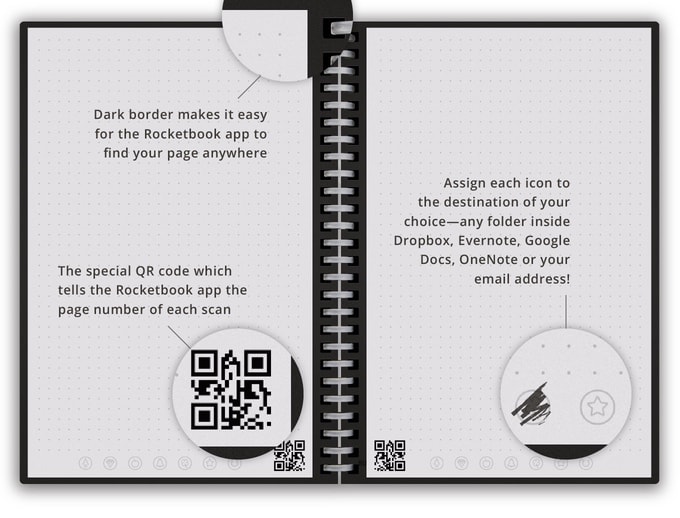
Rocketbook - It's going to seem magical, you are going to say "no way!" but Rocketbooks are a way to digitally store your handwriting and artwork in a reusable notebook. Buy the Rocketbook Wave and when it is full, clear it by putting it in the microwave with a cup of water. Wipe down the Rocketbook Color. The options are endless and the front of your refrigerator will be free of clutter as you keep your keepsakes online!  

Legos - Yes Legos! Nothing new here but the opportunities are endless! Do you have a future architect or a budding engineer, buy that kid some Legos and let the creativity abound. Do you have girls, buy her LOTS of Legos- we need more women in STEAM jobs. Google "Lego Challenges", print off the cards and stand back!

Sign Up for Coding Accounts - There are so many options to teach your child more about coding. What's coding? You might know it as computer programming. The nice thing about this option is that you can use the computer you already have at your house and just create accounts for your child- many options are absolutely free! Check out Scratch, the coding website written by two MIT students. Let them work in code.org and see what they enjoy. Invest in what peeks their interest. There future is computer science. Prep your child now for their future!

Virtual Reality Headset What is virtual reality? VR allows personalized virtual reality opportunities from games to field trips as if you are there in what feels like a total immersive experience. The opportunities are growing every day. Let your child dissect a frog or look at a 3D heart model using something like the Merge Cube below. You can use a phone with the lower cost VR headsets like as Google Cardboard but there are also stand alone VR Headsets like Occulus Rift.
 https://www.youtube.com/watch?v=i4Zt3JZejbg

Merge Cube - This is a virtual reality experience you can hold in your hand. It works with both android and iOS phones and gives you a very cost friendly virtual reality option. Play games or view 3D anatomy images. It is a soft spongey cube that won't break easily but gives insight into the future of learning. 

Kanu Computer Kit - Have a future IT person on your hands or an engineer? Let them put a computer together! Learn about the inner workings of a computer and create one by themselves. Is your child a tinker/builder? This is like Legos on steroids for that type of kid. Not only are they building but they are learning how computers work at the same time.

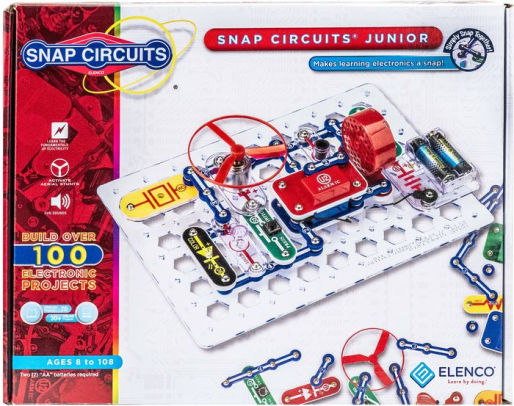
Snap Circuits Jr. - A wonderful cost effective way for children to learn about electricity and the basic properties of electronics. Snap Circuits Junior allows children to create while teaching them the concepts of circuits and how they are a part of things we use every day. 

Arduino Circuitry Kit - Take circuitry to the next level with older children and invest in Arduino kits. These kits include components they can manipulate to create models of all sorts of things. Your future electrical engineer will thank you for this gift!

As you consider the various gifts above, click on the names and it will take you to a link where they are available to be bought. I am not endorsing the companies I've linked to, just trying to give you an option to see costs and availability. What I love about each of these options is that it is more than just a toy. Some of them are training your child how to think logically, some of them will require a design thinking mindset, and some will just cause them to go "hmmm" and then question what they currently know and consider their futures.

As I have mentioned, some require the use of  computer or mobile device to make them work. Please hear me say that research shows that the best learning during computer gaming happens when parents participate with their children. Take 15-20 minutes out of your day a couple days a week and grow your students STEM skills for the future they are going to be living in. Learn with them! I certainly don't know how to do all the things listed here, and that is the beauty of these gift ideas...the possibilities are endless! 


Thursday, June 29, 2017

My #ISTE17 Takeaways


Rachelle and myself
Traveling alone to ISTE this year gave me lots of time alone with my thoughts and my learning. Meeting up with my friend Rachelle Poth on the last day led to one of my greatest moments of reflection. When we talked about the things we had done during the week it was very different from each other. Rachelle presented multiple times (and I must say she's amazing at sharing her classroom stories) and I was there as an attendee only.
For me, that moment was a realization that ISTE meets needs in many different ways for many different personality types. It's easy to get lost in the crowd if that is what you want or to be in the middle of everything learning AND social. I was "all in" for learning this week and here are my takeaways to learning more about:


  • Google Applied Digital Skills- Yes, I did stand in a 30 minute line for a 30 minute session to learn more about Google's new Applied Digital Skills curriculum.
     A free, stand alone curriculum that can be found at https://www.cs-first.com/en/apps. Our school recently started looking at the scope and sequence of digital skills we want our students to have by the time they graduate from our school. What I love about this curriculum is that many of these skills could be mastered with these very relevant curriculum ideas that 13+ year old students would both enjoy doing and benefit from. 
  • Snapping, Gramming, and Scoping Your Way to Engagement-  
    Shaelynn, Steven, and myself
                              
      Educators Steven Anderson (@web20classroom) and Shaelynn Farnsworth (@shfarnsworth) created an interactive learning opportunity that challenged me in how to reach students, teachers, families, and constituencies with the use of social media. I've often used social media to share the story of our school using the hashtag #ccslearns but I'll be honest, I think my assumed audience was almost always my professional learning network. I am currently reflecting on how I can use it more to reach broader in my own school community. Steven's sharing of data shows a window of opportunity to reach our families and share our stories in a platform that will be looked at. As most schools can attest, the percentage of emails sent and read by families is small. Why not meet them where they already are looking? And as I've heard often but don't know who said it, "someone is going to tell your story, shouldn't it be you?" 
  • Big news from Wonder Workshop: Challenge Cards- Dash and Dot are some of our favorite  robots to introduce robotics to preschool and elementary students. What a great opportunity to meet Charlotte this week- she's the creator of the new "Challenge Cards: K-5 Learn to Code Starter Pack" that hit the market in September. I had a little look at the cards and can't wait to add them to our curriculum. These cards "meet both CSTA and ISTE standards are aligned with Code.org's Computer Science Fundamentals series." (store.makewonder.com)
    Charlotte of Wonder Workshop 
  • Creating Interactive Professional Development Opportunities- This idea has been growing in my head since Edcamp Gigcity but attending a session by Michele Eaton solidified in my head how I want to do this. I plan to introduce one tool every 2 months to our teachers (I'm working on curating those tools now) via an interactive introduction that they can access at any time. My hope is that in the two months the teachers will try the tool in their own classrooms.
Obviously there were tons of learning moments at ISTE for me both in and out of the conference center, it's like learning from a firehose, but these are the top things I am excited about!