Wednesday, July 10, 2013

Why this T-model chaffs me just a bit...


I keep seeing this posted on twitter over and over again and while I agree with it's broad concept, the business education technology teacher in me also gets a little undone by it; So much so that it wakes me up at night and causes me to fear we are going backwards! Please allow me to share..
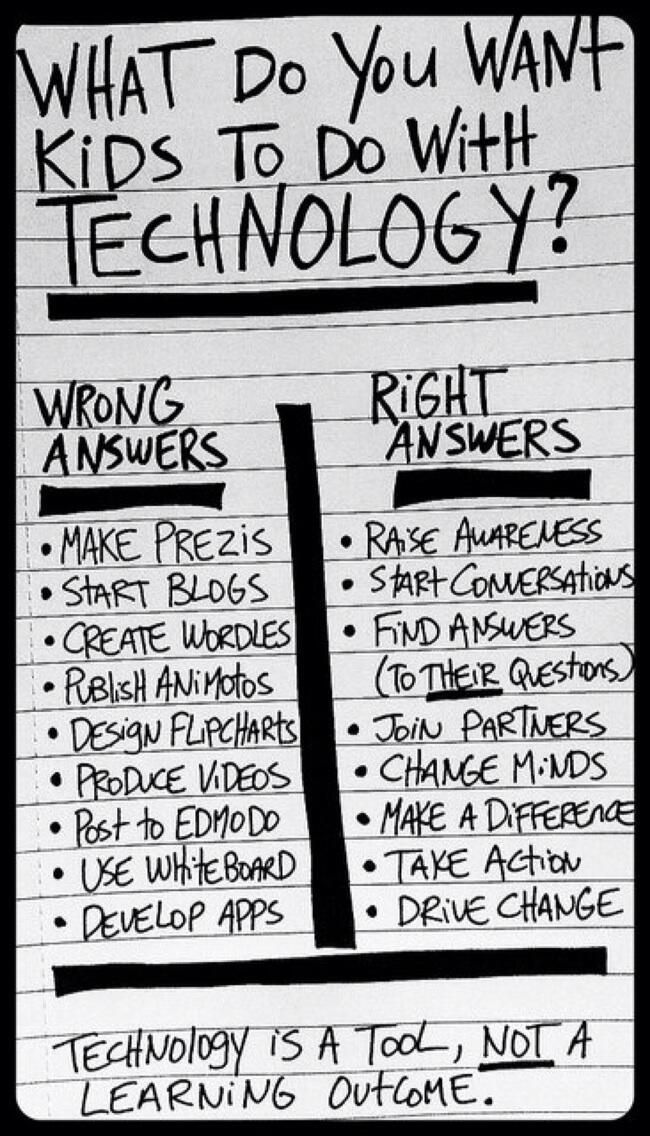
First, I believe technology is a tool, not a learning outcome. I believe technology is what oils a lesson plan for greatness. I believe technology allows students to delve deeper, dream bigger, and research easier. I can't even begin to explain the excitement I have had about seeing what I "teach" become part of the every day curriculum. BUT...

The model above scares me just a bit. Why does mobile learning have to have a RIGHT AND WRONG approach? The truth is, at some point someone has to teach these students how to navigate and use prezi, blog responsibly, access Wordle sites, etc. That is why I find the above model scary.

Technology in the schools has come a long way baby...for years, I have taught a set curriculum that said my students needed to know how to create PowerPoints, save files, etc. All these standards have been VERY specific to meet the ISTE standards and to equip my students for the future. The sad part is that often I have "created" lesson plans that had nothing to do with authentic learning just so I could put a check mark by a standard that need to be met. 

I have been BEYOND excited that this is changing...I now work with teachers to meet my standards but the students are working on projects that mean something to them, something they are studying in class already. It has become authentic learning and is morphing into true learning of technology that just happens flawlessly. This next year I will be in the classroom while a teacher teaches content and I work the room while student pick their app/website/output of choice to show, learn, create, or "take action." 

As this shift happens, there will be less me and more or students just doing what comes naturally, BUT... we cannot forget the fact that standards for technology still exist. Curriculum in ed tech still has to be "taught." When we don't teach that tools have rules and that there are proper ways for creating we undermine the role of technology and we do not show the students the pros and cons to the power at their fingertips. 

I have felt like we, as an educational community, were heading to a place where technology would just seamlessly take place in the classroom and that less time would have to be taught "teaching" the technology...and that is a good thing! BUT...we have to also make sure the teachers take seriously their responsibility to help their students become good digital citizens AND teach them how to create WORTHY output. 

Now I will step down from my soapbox. ;)


Sunday, July 7, 2013

Why Are We Afraid to Manage Misuse of BYODs?

I push around a cart of iPads to elementary students. The cart and iPads belong to the school. If a student disobeys the rules regarding iPad usage, there is immediate feedback to that student. I have been made aware of many teachers not feeling comfortable with managing misuse of devices in a BYOD environment. To be honest, in the beginning it baffled me but I tend to be on the side of a strict disciplinarian teacher instead of relaxed; I also teach elementary students which makes discipline easier (in my opinion).

So these thoughts have been mulling around in my mind:
a) Are the teachers that feel uncomfortable managing misuse the same teachers that feel uncomfortable with discipline as a whole?
b) Are these teachers the type that want to have positive friendships with their students and therefore feel uncomfortable changing the dynamics this way?
c) Is there a way for these types of teachers to feel more comfortable with technology in the classroom?
d) Isn't discipline something we MUST take on when we decide to be a teacher (might be stepping on some toes here)?
e)  Can we assist teachers in this area to help them?

There is a fine line that we as educators walk when interacting with our students. We know that if we are seen as a "tyrant" teacher, our students will shut down and not listen to us at all. We know if we are too soft, they will run all over us. As much as I love a very "fun-based" lesson, I also know some students have a hard time finding the balance between the "silly" and continuing to learn in the more relaxed environment. I get the struggle...as a mother of teens, I live that movie as well.

Here is my fear if we DO NOT remain consistent across the board in our discipline of BYOD:
a) Students will see the school's inconsistency and think that the rules are fluid and flexible.
b) Students will sense the fear of the teachers (or see their desire to look the other way) and not see why we have those rules in place.
c) These teachers that seem so easy-going all the time eventually have their "boiling point" and out of nowhere they have a day in class where they snap and get fed up with the misuse because after a while even the rule-follower students start seeing there are no repercussions for breaking the rules. Then the students are like, "What's up with Mrs. Davis today?"  Our hypocrisy will be eaten for lunch.


So what do we do?
We have to be engaging in our lessons, we have to set limits from day one, we have to move around our classrooms and challenge the students that seem to be off-task by giving them a technology-based task. "Jessica, did you hear that term I just said? "Digital literacy," please look it up on www.webopedia.com right now and tell the class what the definition is." We have in that one statement, brought Jessica back into the classroom discussion and allowed her to use the technology in her hand.

We must remain consistent across the board because students need boundaries and teachers accomplish much when students remain within these boundaries. Does this mean we ban twitter, vine, or other social media? No, it means it is to be used as the teacher sees fit in the classroom but not opened if it has not been teacher directed. See my earlier post http://techhelpful.blogspot.com/2013/06/the-struggle-is-real-equipping-teachers.html  for helpfulness on how to manage and set standards up front for you and your students.

Will it be easy?
Not always. Every lesson plan that I teach has varying degrees of responsiveness and qualities of engagement. I do believe it can be managed and the main thing is, we must not give up. As the new school year begins we must pinky promise each other that we will remain firm in our resolve to deal head-on with misuse of technology. We must work to be engaging. Our focus is not the technology, if we have to constantly deal with misuse, the lesson plan is lost. The technology should be what lubricates the lesson and makes it more fluid. We have to remember that the classroom is ours, and even though that device belongs to the student and their family, you have a right to expect proper use while it is in your classroom.

If a student was poking another student with a pencil during instruction time or throwing a pencil across the room at you when you were writing on the whiteboard, you would take the pencil and respond to the actions. The pencil belongs to the student just like the device does. Misuse is misuse and there are different degrees of misuse that you will have to deal with in the classroom.

How will you revamp your lessons to best meet the needs of your students now that you have the blessing of technology in your classroom?


Tuesday, July 2, 2013

Apple Configurator Fixes

There are three technology based things that have made me very happy this summer:
 1- My new zero turn radius lawn mower.
 2- Teaching Vacation Bible School at my church using iPads with fifth graders.
 3- Learning that Apple Configurator has become more user friendly. 

 Boy, I sound nerdy. But for real- last January, our school invested in a rolling cart of 30 iPads and we chose Apple Configurator to prepare and supervise the iPads. Every single week I felt like I did everything the exact same way but I would get an error message or they did not all respond the same way. This caused some major stress on my part. Some days I didn't even know that I had an issue until I started teaching the lesson. That is when you smile at your students, change plans in midstream and pretend like it was all part of the lesson plan!

 My two biggest complaints about Apple configurator were:
A- You never knew how long it would take to update anything. The software gave you no idea.
B- If things didn't work, there were no error messages to give you an idea how to correct the problem.

BUT, both of these issues have been resolved and maybe just maybe Apple Configurator's name will not be a "bad word" in my vocabulary this fall. I'm excited to use it again!

Friday, June 14, 2013

The Struggle Is Real- Equipping Teachers for 1:1 byod

This is the presentation I did in May for some of the middle school teachers to help them have ideas on how to manage the devices in the classroom.

Thursday, June 13, 2013

Ideas for Back to School Professional Development

Offer different classes that last 15 minutes each, each teacher must pick 6 they are interested in going to. Maybe at the end, regroup and give out door prizes to teachers that have 6 different presenters sign off on their workbook page or something?

Possible things to present:
Twitter as professional development
Classroom management with BYOT environment
Poll everywhere
Moodle
Renweb
Using PDF annotators
Creating folders in google drive
Intro to Evernote and creating notebooks in Evernote
Prezi
Kurzweil
Flipping classrooms
Blended learning

Have different teachers teach the above but don\'t require more than one time so that they can also participate. You don\'t want your best tech savvy teachers not to be a part of learning as well.
Things to think about:
Who can we get to teach the above?
Any other things should be on the list?
Have presenters create any handouts or presentations into a google drive folder
I will create QR codes to place outside classroom doors so teachers can access the info for that presentation as they enter
Include some type of curriculum based presentations as well? I.e.- apps that are well liked and used for different subject areas. (Or do this the second half of day?)
Allow upper and lower to participate in this?
Use outside sources to teach some of these things?
Teachers decide what they want to take on the fly or make them sign up for presentations on a google document so we can plan for enough seating?

Monday, May 27, 2013

Memorial Day

Today I am thankful for those who served and gave their lives for freedom, thankful for those that came back with horrid memories etched in their minds to live with forever. Thankful for those that do this everyday not knowing what each day may bring. Thankful for my freedoms I usually take for granted because of the great men and women, past and present, that make me feel more at ease than I know I should be. Thank you. What a great day to teach students about our freedoms! Since school is out for us, tell your children, friends, and neighbors...we live in "America the Beautiful."

Monday, May 13, 2013

Great Elementary Education Apps for Summertime Learning!

Educational Helps:


Developed by a university this math app is free and is a favorite of third-graders. It is geared for 3rd through 8th grade. The app is colorful, not cheesy, there are no ads and it does an excellent job of teaching the number line. Children dive for hidden pearls within the number line and the difficulty increases after every successful dive.
Analogies 4 Kids, $0.99
This app is perfect for the logic lover kid of yours. The analogies presented are similar to those on a SAT but presented in an easy to follow way that even a young kid can figure out. Analogies are often used in gifted programs and seen on IQ tests - this app offers 70 questions and is fun practice. 
 Rocket Math, $0.99 Do math, earn money, build a rocket and watch it fly in outer-space. There are 56 math missions ranging from simple addition to square roots and everything in between (double digit division, decimals, fractions, multiplication, money counting, etc.). For under a dollar this app can take you from kindergarten to high school. I like this app because it has a built in way to push kids further. They can’t trick their ride (their rocket) without completing more math
.Stack the States, Free & $0.99

There is a free version, but I think you will want to go ahead and purchase the other version quickly, it is a bit addictive to me. Pretty neat way to learn states and capitols.
Starfall ABCs, $2.99
Perfect for kindergartners!t There are hundreds of ABC apps out there but this one is no nonsense, easy to use, fun and effective. Children can choose from puzzles, mazes, flash cards and more to gain a well rounded knowledge of the alphabet.
Mad Libs, Free & $3.99
Another one of those apps that we upgraded to the full version after checking out the lite edition. Just like the traditional paper Mad Libs (which we have spent a fortune on), children type in parts of speech to create a silly story. For those who are having trouble finding a part of speech to fill in there's a "Hints" button that offers a scroll of words below. For kids who struggles with comprehension this is a fun app to develop those early parts of speech skills, not to mention we all get a good giggle at the end when reading their stories.
This is a "thinking" app that requires children to build contraptions out of toys and everyday items that solve puzzles. You can also create your own contraptions with slingshots, darts, ropes, balloons and more. It's adorable! There are over 70 levels and children have been found creating similar contraptions in real life. Great way to get kids thinking deeper.
Math Bingo, $0.99
This app is a perfect way to practice math skills. Children select a game (add, subtract, multiply, divide) and the difficulty (easy, medium, hard) and play traditional bingo. They are given a problem and need to find the numerical answer on the bingo chart. When they get a "bingo" they earn a "bingo bug" and collect them - the bugs are quirky and fun, which is what makes them fun to collect.
Unblock Me, Free
This can be an addicting app for all ages. Amazed by the amount of puzzles offered in the free version. It's a puzzle app which requires some great critical thinking and perceptual ability. With 4,200 puzzles offered in this free app what do you have to lose, but time? Great for kids and adults, this app manages to captivate us all while strengthening our problem solving skills. A must have!
Hangman, Free
The banner ad bothers me but for a free app that offers the traditional hangman game. You can choose from a number of categories like fruit, vegetable, family, food, drink, clothes, color, body parts, countries and more. The game is timed while you guess what letters are used to figure out the word before your time is up.
SpellBoard, $4.99
One of the most expensive apps I've ever purchased but well worth the money for the child who struggles with their weekly spelling tests in elementary school. Can be used weekly by recording child's spelling list in your own voice, recording a sentence using the word in your own voice, and generating a quiz. Children can study the quiz before taking it by completing puzzles and/or writing the word on a realistic notepad. They can ask to repeat the word (in your own recorded voice) or ask to speak the phrase (in your own recorded voice). Best of all parents can check in to see the history of the tests to see the percentage and where they need additional help.
Fractions, $0.99
Children have two options "Learn" or "Test". The learn option goes through a series of flashcards (easily read with bright images). The test option gives you three categories (Identify, Equality, Arithmetic) and three levels of difficulty for each. Easily the best app out there for fractions. It starts with elementary fraction lessons of a pizza cut in half and continues with the "hard" level of "arithmetic".  Another app that starts in kinder and takes you up to high school.
Sushi Monster  Free. My students will chose to play this one very often. It has varying levels and therefore can meet the needs of k-5 students (or above). Students like this app because it has great graphics and they are given choices when answering. It helps them learn estimating because of this option.
Story Lines  Free. (We use the one listed under “Education,” not “Games) One of our favorite ways to do creative writing in the elementary school. Students call play by themselves or with a friend. It is a great collaboration app and an excellent way to teach students how to write “visual sentences” with many adjectives. I use this app 2-5 grades.
Chicken Coop Fractions Free. Great for kids learning about fractions because you “catch” eggs on a number line. The students love to watch the hens lay the eggs. There are some ads on this app that can be annoying.Story Wheel  Free and  $2.99.  Spin a wheel and collect separate parts of a story to be assembled in the correct order; finished tales pop into life as animations!

These are all great apps for children to use over the summer for fun ways to keep learning.
(http://www.classychaos.com/links-topmenu-20/957-best-educational-ipad-apps-for-elementary-school-aged-kids -List adapted and added to by Julie Davis)